

Wiz
Overview
Section titled “Overview”Integrate your Risk Register with Wiz. Each Wiz issue is imported as its own risk record.
- Source: Attack Surface Monitoring
- Type: Configuration
- Opened By: “Wiz Integration”
The integration can be enabled directly from your Adversarial tenant via Settings > Integrations. The necessary details to connect your Wiz environment are the API Client ID and Client Secret from a service account scoped to read issues.
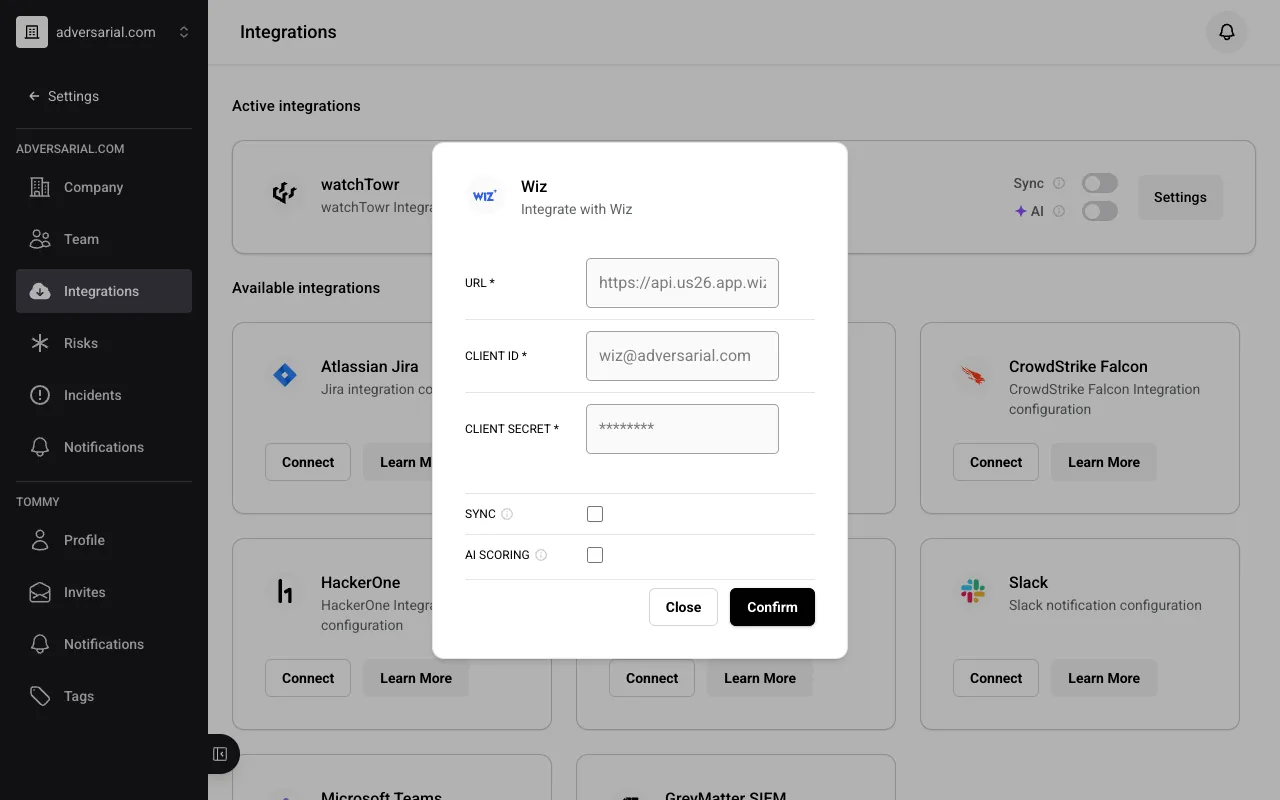
Required Wiz service account permissions
The Wiz service account needs the following read scopes. These cover both the issues/findings the integration imports as risks and the inventory data used to enrich them.
Detected Issues/Risks (13 roles, to read Wiz detections/alerts)
read:issuesread:vulnerabilitiesread:detectionsread:data_findingsread:iac_findingsread:threat_issuesread:attack_surfaceread:posture_issuesread:excessive_access_findingsread:software_supply_chain_findingread:ai_security_findingsread:access_findingsread:sast_findings
Inventories (19 roles, to read Wiz’s inventories/current configuration visibility)
read:api_endpointsread:application_servicesread:cloud_accountsread:cloud_configurationread:endpoint_attack_surfacesread:host_configurationread:inventoryread:kubernetes_clustersread:network_connectionsread:network_exposureread:registriesread:repositoriesread:repository_contentsread:resourcesread:sbom_artifactsread:secret_instancesread:security_frameworksread:threatsread:user_accounts
Status Mapping
Section titled “Status Mapping”Wiz issue status is mapped to an Adversarial risk status using both the status and the resolution reason:
| Wiz Status | Resolution Reason | Adversarial Status | Notes |
|---|---|---|---|
| Open | — | New | |
| In Progress | — | Remediation | |
| Resolved | (any) | Closed | Closed Date carried over |
| Rejected | Exception | Remediation | Time-bound exception |
| Rejected | (any other) | Closed |
Severity Mapping
Section titled “Severity Mapping”Wiz severity maps directly to Adversarial urgency. Only Cloud Configuration and Toxic Combination issue types are imported — Threat Detection issues are excluded. Informational severity issues are excluded.
| Wiz Severity | Adversarial Urgency |
|---|---|
| Critical | Critical |
| High | High |
| Medium | Medium |
| Low | Low |
Fields
Section titled “Fields”| Wiz Field | Adversarial Field | Notes |
|---|---|---|
source_rules[0].name | Title | Falls back to “Wiz Issue {id}“ |
| (multiple fields) | Description | Assembled from the Wiz issue description, projects, resource details, technologies running on the resource, public network exposures, Wiz’s exploitability validation, tags, resolution context, service tickets, notes, and Wiz console links |
severity | IRU | Via severity mapping above |
created_at | Discovered Date | Uses reopened_at for reopened issues (see below) |
resolved_at | Closed Date | For Resolved and non-Exception Rejected issues |
| (static) | Source | Always “Attack Surface Monitoring” |
| (static) | Type | Always “Configuration” |
Reopened issues
Section titled “Reopened issues”When a previously closed Wiz issue is reopened, the Discovered Date is reset to the reopen timestamp (reopened_at from Wiz) instead of the original created date. This prevents the time the issue spent closed from inflating time-to-remediate on the Remediation Agility chart.
The following Wiz open reasons are treated as reopens:
- Issue Resurfaced — a resolved issue has reappeared
- Reopened by User — a user manually reopened the issue
- Rejection Expired — a rejection/exception expired, reopening the issue
All other open reasons (e.g. first seen, resource created) continue to use the original created date.